Nuelink · Landing pages · SEO · Conversion
How I Built and Launched 75 Landing Pages for Nuelink
From zero landing pages to a connected system for features, platforms, and specific tasks—with clear calls to action and tracking.
The brief
Starting from zero
When I joined Nuelink, it had no landing pages. I started this work from zero and went on to build and launch 75 landing pages covering its features, platforms, and specific use cases.
The idea was simple: help people find the part of Nuelink they needed, show them how it worked, and give them a clear reason to try it.
That meant building the pages, organizing them, linking them together, and adding tracking so we could understand what visitors did next.
The challenge
The Missing Piece
Nuelink could do many things, but it did not have dedicated landing pages to explain them. Someone searching for an Instagram scheduler needed a different explanation from someone looking to upload tweets in bulk.
I wanted each person to land on a page that matched their need, rather than having to work out the whole product for themselves.
The pages
Building Pages for Specific Needs
The 75 landing pages covered broad features, such as scheduling, as well as individual platforms and specific tasks.
For example, the scheduling page explains the feature as a whole.
The Instagram scheduling page focuses on using it for Instagram.
Other pages cover narrower tasks, such as bulk uploading tweets or crossposting Instagram Reels to Pinterest.
Each page gave us a place to explain a specific use of Nuelink and show how the product could help.
Examples of the pages
The structure
Making the Pages Easy to Find
I also worked on how these pages linked to one another.
The feature index gives visitors an overview, with links to the more specific pages.
Some feature pages provide another step. The scheduling page, for example, links to scheduling pages for individual platforms.
For example, a visitor can go from the feature index to the scheduling page, then open the Instagram scheduling page to see how Nuelink helps them plan and publish Instagram posts.
This gives visitors a clear route through the site: explore the features, choose the one they need, and read about the task or platform that matters to them.
The internal links also help search engines discover the pages and understand how they relate to each other.
The conversion path
Giving Visitors a Clear Next Step
The pages needed to do more than explain the product. They also needed to help interested visitors take the next step.
I worked on the calls to action, the buttons inviting people to start a free trial, alongside the page content.
The aim was to explain the benefit of a feature, then give someone who needed it a clear way to try Nuelink.
The measurement
Tracking the Pages and Buttons
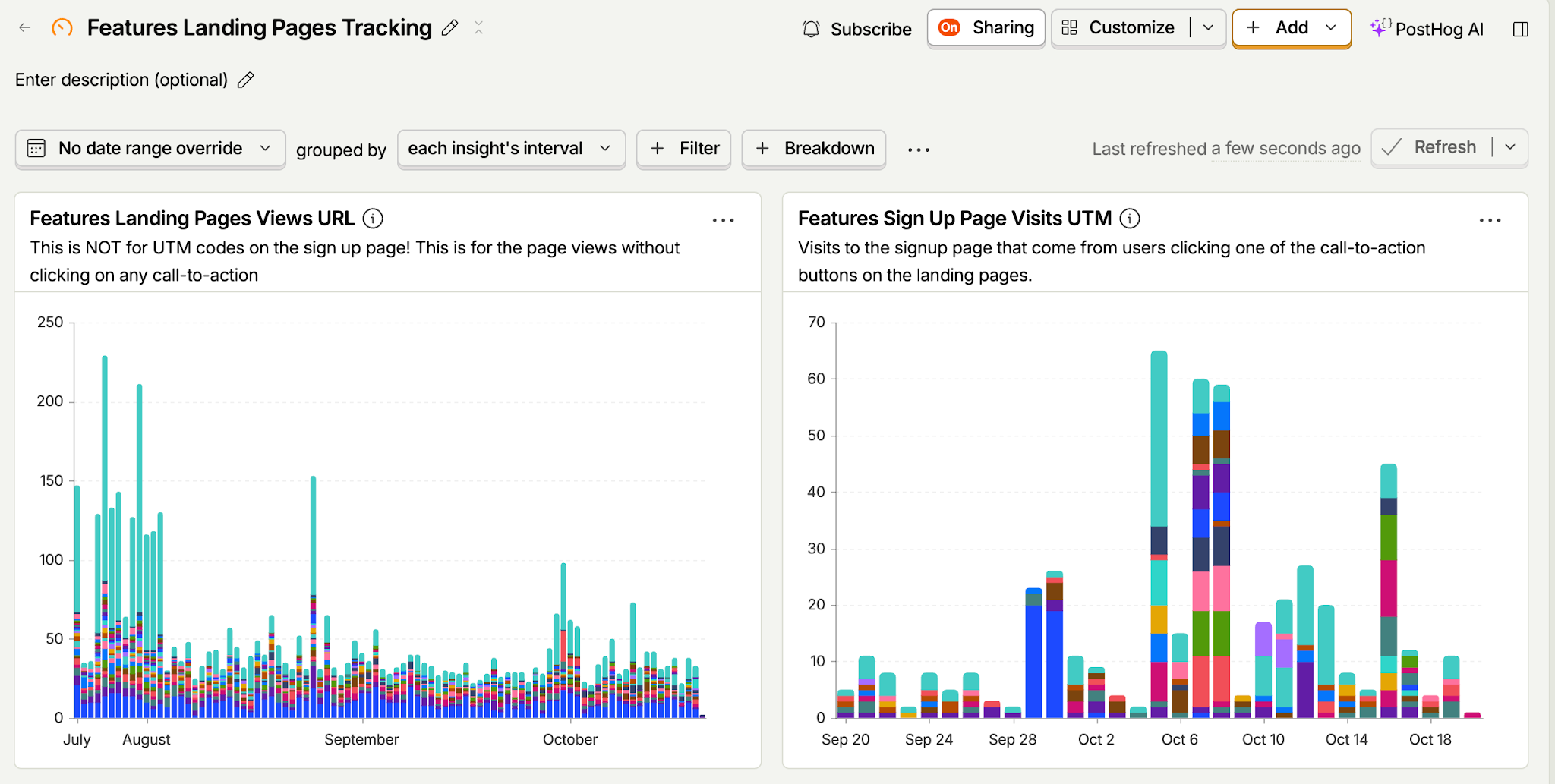
I built a PostHog dashboard to track two steps: visits to the landing pages and visits to the signup page after someone clicked a call-to-action button.
- Landing-page views: I tracked views by page URL to see which feature pages were getting traffic.
- Visits to the signup page: I used UTM tags on CTA links to identify the landing page and the button position or group that sent someone to the signup form.
A Real Example of the Tracking Link
The main free-trial button at the top of the scheduling page uses this link:
Each part tells me something about where the visit came from:
- utm_source=nuelink: the link came from Nuelink’s own website.
- utm_medium=features: it came from a feature landing page.
- utm_campaign=scheduling: it came from the scheduling page.
- utm_content=btn-hero: it came from the main button at the top of that page.
The same page uses btn-features for buttons within the feature sections and btn-floating for its floating button. This lets me distinguish CTA positions or groups. Buttons sharing the same tag are grouped together in the reporting.
This helped me look beyond traffic. I could see which pages attracted visits and which sent people toward trying Nuelink, giving me a starting point for deciding where to improve the copy, layout, or buttons.
The signup-page report shows that someone reached the signup form. Completed signups are a separate step.
The outcome
What I Built
Nuelink went from no landing pages to 75 launched pages, with internal links connecting them and tracking built into the calls to action.
I started and owned this work. The feature index and the pages linked from it are part of what I built for Nuelink.
This gave the product a clearer way to explain what it could do, reach people looking for specific solutions, and guide interested visitors toward a free trial.
The results
Seven pages. A seven-day search snapshot.
These pages target specific tasks and smaller search opportunities. The seven pages shown in the source snapshot delivered:
These figures cover the seven pages in the documented seven-day snapshot, rather than the full set of 75 pages.
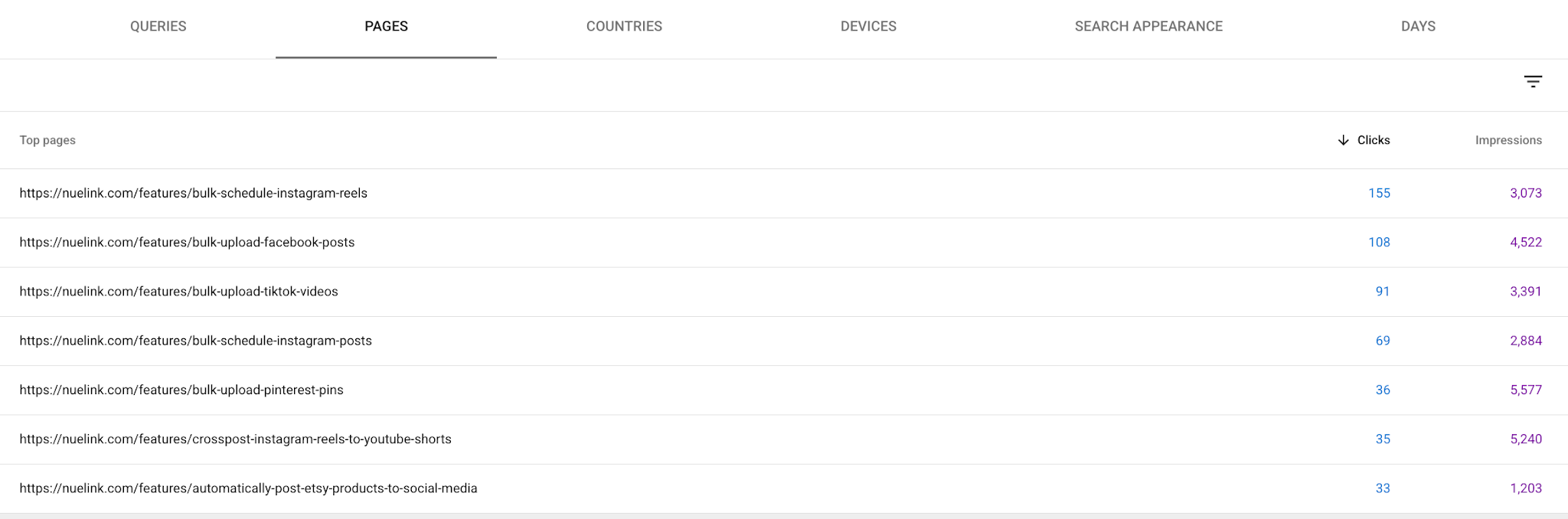
This shows how several niche pages can add up to useful search traffic around tasks Nuelink helps people complete.